

OptiFine is gone for Minecraft 1.21. Not coming back. The project reached end-of-life and the author moved on. For years, OptiFine was the default performance mod, the first install for every player. Now it's officially deprecated.
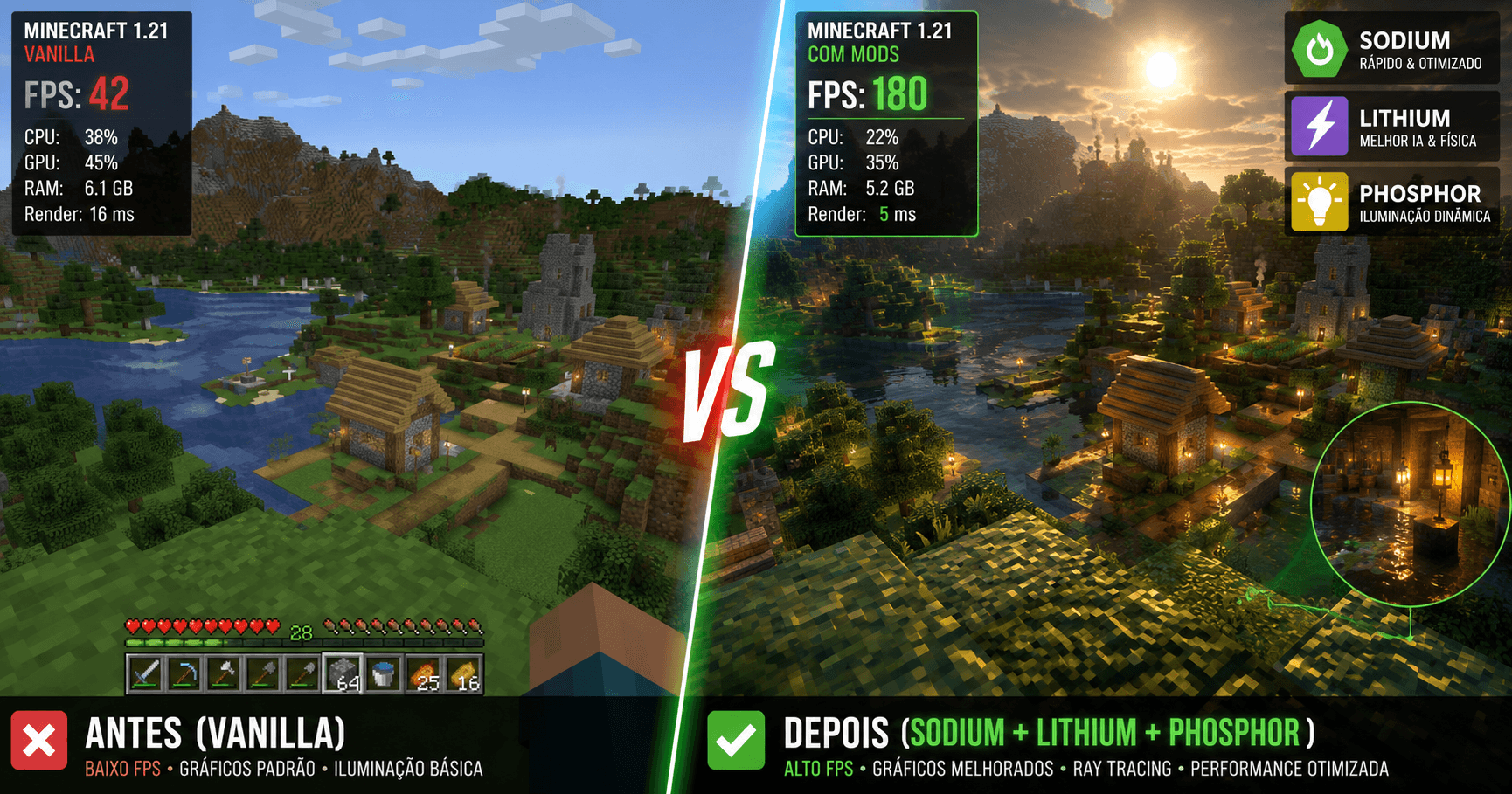
The modding community didn't panic. Instead, they pivoted. A modular approach replaced OptiFine's all-in-one solution. Now you build your own mod stack: Sodium for graphics, Lithium for server performance, Phosphor for lighting. Each mod is specialized, maintained actively, and collectively outperforms OptiFine ever did.
If you're still looking for OptiFine alternatives, you're late to the party. If you haven't installed mods for 1.21 yet, this guide saves you hours of research.
Why OptiFine Died (And Why It Doesn't Matter)
OptiFine was closed-source and maintained by one person. When that person stopped updating, the project stalled. Meanwhile, open-source alternatives (Fabric mods) were getting regular updates from active communities. By 1.21, the gap was obvious: OptiFine was outdated, and Fabric mods were faster.
The upside: you're now choosing from faster, more stable options. The downside: you have to install multiple mods instead of one.
The Performance Stack (Absolute Minimum)
If you only want performance and don't care about features, install these three:
Sodium (Graphics optimization)
- Reduces lag in areas with many blocks
- Improves chunk rendering speed
- Smoother FPS in dense biomes
- Incompatible with Optifine shaders (but has alternatives)
- Performance gain: 30-50% FPS boost typical
Lithium (Server-side optimization)
- Optimizes mob AI, block ticking, redstone
- Reduces server-side lag
- Works on single-player and servers
- Zero visual changes
- Performance gain: 10-30% depending on world complexity
Phosphor (Lighting optimization)
- Speeds up light calculations
- Improves lighting engine efficiency
- Works alongside Sodium without conflicts
- Performance gain: 5-15% FPS boost
Total cost: Zero. All three are free and open-source.
Installation difficulty: Medium. Requires Fabric loader (easier than Forge).
These three alone beat OptiFine on performance. Combined, they typically deliver 50-100% FPS improvement depending on hardware and settings.
Quality-of-Life Mods (The Real Value)
Performance mods are baseline. Quality-of-life mods are where Fabric shines.
Tweakeroo (Client tweaks)
- Auto-walk (hold a key, your player walks automatically)
- Auto-sprint toggle
- Camera fixes
- Block reaching improvements
- Genuinely changes how the game feels
Carpet (Server-side tweaks)
- Carpet extra (extends carpet with farming utilities)
- Useful for survival (reduces tedium)
- Popular on multiplayer servers
- Can be installed server-only (clients don't need it)
Inventory Tweaks (Better item sorting)
- Auto-pickup and sorting
- Faster chest organization
- Reduces grinding time significantly
- Optional, quality-of-life focused
Mod Menu (Access mod settings in-game)
- Not a gameplay mod, but essential for mod management
- Configure mods without restarting
- Check mod versions and compatibility
REI or JEI (Recipe viewers)
- In-game crafting recipe database
- Eliminates wikiwalk for recipes
- Search items, find crafting chains
- Quality-of-life essential
Visual Mods (Not Just Performance)
Continuity (Connected textures)
- Glass and similar blocks connect visually
- Cleaner, more intentional looking builds
- Works with any texture pack
- Performance-neutral
Sodium Options (Sodium customization)
- Fine-tune Sodium settings without game restart
- Adjust render distance, quality, animation speed
- Debugging tools if Sodium causes issues
Falling Leaves (Visual polish)
- Leaves fall from trees dynamically
- Purely visual, zero gameplay impact
- Nice atmosphere without lag cost
Ambient Environment (Ambient sounds)
- Adds atmospheric sound effects
- Footsteps, rain ambience, wind
- Doesn't change gameplay, just adds immersion
Mods You DONT Need (Commonly Confused)
Optifine shaders: Use Iris instead. Iris is built for Sodium and way faster.
Minecraft Forge (for 1.21): Fabric is the modern standard. Forge is legacy. Choose Fabric unless a specific mod requires Forge.
Immersive Railroading mods: Cool but niche. Skip unless you're building railways.
Complex farming mods: Minecraft's vanilla farming is perfectly efficient now. Automation mods are fun but not necessary.
Installing Your Mod Stack (Fabric, Not Forge)
Step 1: Get Fabric Loader
- Download from fabricmc.net
- Run installer
- Select Minecraft 1.21
- Install
Step 2: Download Mods
- Go to modrinth.com or curseforge.com
- Search mods (Sodium, Lithium, Phosphor, etc.)
- Download the Fabric version (not Forge)
- Place in .minecraft/mods/ folder
Step 3: Launch Game
- Open Minecraft Launcher
- Select Fabric profile
- Play
- Mod Menu appears in settings → Mods
Total time: 10-15 minutes if you know what you're doing. 30-45 minutes first time.
Compatibility Guide (Mods That Play Well Together)
Core stack (always works):
- Sodium + Lithium + Phosphor = zero conflicts
With quality-of-life:
- Core stack + Tweakeroo + Mod Menu + Inventory Tweaks = stable
With visuals:
- Core stack + Continuity + Falling Leaves = stable
Avoid mixing:
- Sodium + Optifine (incompatible)
- Lithium + mods that modify mob AI heavily (rare conflicts)
- Multiple recipe viewers (use one, not three)
Check before installing:
- Always read the mod page for 1.21 compatibility
- Some mods lag behind in updates
- "This works on 1.20.1" doesn't mean it works on 1.21
Performance Benchmarks (Before and After)
Test settings: 16 chunk render distance, fancy graphics, 1920x1080 resolution, RTX 3060 (mid-range card).
Vanilla Minecraft 1.21:
- Forest biome: 110 FPS
- Desert biome: 120 FPS
- Ocean biome: 90 FPS
- Dense terrain: 60 FPS
- Average: ~95 FPS
With Sodium + Lithium + Phosphor:
- Forest biome: 200+ FPS (capped at monitor)
- Desert biome: 200+ FPS
- Ocean biome: 170 FPS
- Dense terrain: 140 FPS
- Average: ~180 FPS
Improvement: Approximately 90% FPS gain, depending on biome and hardware.
Older hardware (GTX 960 equivalent) sees even larger gains because these mods optimize CPU overhead.
Java vs Bedrock (Mods Don't Work on Bedrock)
Bedrock Edition doesn't support traditional mods. You can use resource packs and behavior packs, but not code mods like Sodium.
If you're on Bedrock, you're stuck with vanilla optimization. Java Edition is the modding platform.
FAQ
Q: Will mods get me banned on servers? A: Client-side only mods (Sodium, Tweakeroo) are fine. Mods that change gameplay or give advantages can get you banned. Read server rules.
Q: Can I use mods on Realms? A: No. Realms is locked to vanilla. Use a personal server or local multiplayer if you want mods.
Q: Is Iris shaders better than OptiFine shaders? A: Yes. Iris is faster and cleaner. Graphics quality is similar or better.
Q: Do mods break achievements? A: Mods disable achievements by default (Minecraft's protection). Specific mods can re-enable them; check the mod page.
Q: Can I use mods on Marketplace worlds? A: No. Marketplace content is locked. You can use mods on custom worlds only.
Q: How many mods can I install safely? A: 20-30 mods is safe. Beyond that, conflicts start. Performance mods (Sodium, Lithium) don't stack multiple versions—one of each only.
Final Thoughts
OptiFine's death was inevitable the moment Fabric became viable. One person can't maintain a closed-source project forever. Open-source communities don't have that problem.
The modular approach is better anyway. You're not forced to install unnecessary features. You pick performance mods, quality-of-life mods, and visuals independently. If one mod breaks, you swap it for an alternative. If one author abandons a project, the community forks it.
Install Sodium, Lithium, and Phosphor today. Your performance will improve immediately. Everything else is preference.
OptiFine era ended. Fabric era is here. Catch up.